Context Memory
Context Memory is an experimental feature and is under active development.
The AI Assistant includes a persistent memory system that lets it remember context across sessions. When you create workflows, configure settings, or share project details, the assistant saves key facts so it can recall them later — even after closing and reopening ClusterApp.
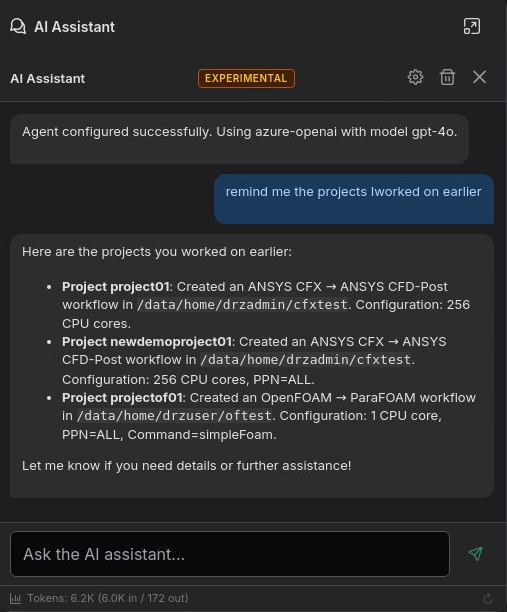
How It Works
- Saving: When you create or modify a workflow, the assistant automatically saves a summary of what was done — application types, option values, project IDs, working directories, etc.
- Searching: When you ask about previous work, the assistant searches saved memories using semantic similarity. It finds relevant entries even if you phrase the question differently from the original.
- Embeddings: No external API calls are needed for memory operations.
All memory data is stored locally at ~/.drizti/hpcbox/agent/context.db.
What Gets Remembered
The assistant saves concise summaries of workflow operations, including:
- Which applications were used and their key settings (core counts, solvers, mesh parameters)
- Project IDs and working directories
- User preferences and project-specific details you mention in conversation
The assistant does not save simulation data, input files, result files, or cluster filesystem contents.
Example
Session 1 — You create a workflow:
"Create an ANSYS CFX workflow for project TurbineStudy01 in /home/user/turbine, using 128 CPU cores"
The assistant creates the workflow and saves a memory entry with the key details.
Session 2 — You ask about it later:
"What settings did I use for the turbine study?"
The assistant searches its memory and responds with the saved details: ANSYS CFX, 128 cores, project ID TurbineStudy01, working directory /home/user/turbine.
Shared Team Context
For teams working on the same cluster, the assistant supports shared context. When enabled, memory entries are written to per-user shared memory context files on a shared filesystem directory. Each team member's assistant can then search across all users' saved context.
This means you can ask questions like:
"Has anyone on the team run an OpenFOAM simulation for the intake manifold project?"
The assistant searches both your local memories and imported entries from other team members.
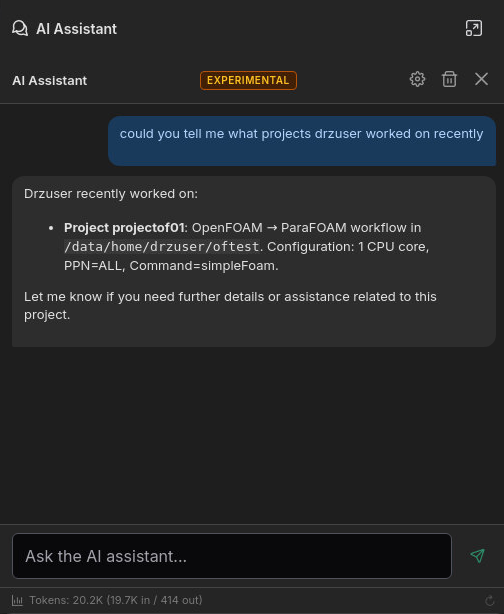
How Sharing Works
- Each user writes only to their own context memory in the shared directory
- Sync happens when the agent connects and can be triggered on-demand via the refresh button
- Monthly rotation archives older entries to keep the shared directory manageable
See the Shared Context User Guide for setup instructions, and the Administration Guide for directory permissions and maintenance.
Privacy
- Local memory: Stored in a database on your machine. Only accessible to your user account.
- Shared memory: Written to shared filesystem. Visible to anyone with read access to the shared directory.
- Embeddings: Generated entirely in-process. No data is sent to external services for memory operations.
- LLM provider: Memory content may be included in prompts sent to the configured LLM provider when the assistant searches for relevant context. The same Data Privacy considerations apply.