External MCP Servers
External MCP server support is an experimental feature and is under active development.
The HPCBOX AI Assistant can be extended with tools from external Model Context Protocol (MCP) servers. This allows the assistant to call tools from third-party services — such as a job scheduler — directly within the HPCBOX interface, without users needing to switch applications.
Use Cases
The primary use case is a job scheduler MCP server that exposes cluster accounting and capacity information. With this connected, the assistant can:
- Recommend the right queue when the user asks to run a workflow
- Report current queue load and available core counts
- Explain why a queued job is waiting (cluster busy, account limit reached, etc.)
- Answer questions about remaining core-hour budgets without the user leaving HPCBOX
Configuration
External MCP servers are configured by the administrator in the central statics/conf/hpcbox.json file. Individual users cannot add external MCP servers — this is intentional to prevent untrusted binaries from running with agent-level filesystem access on the cluster.
Add an AGENT_MCP_SERVERS array to hpcbox.json:
{
  "AGENT_MCP_SERVERS": [
    {
      "name": "gcs",
      "description": "Job scheduler — queues, core availability, account balances",
      "command": "/opt/drz/soge/bin/lx-amd64/qontrol",
      "args": ["mcp"],
      "trust": true,
      "timeoutSeconds": 30
    }
  ]
}
Configuration Fields
| Field | Required | Description |
|---|---|---|
name | Yes | Short identifier for the server. Used as a prefix for all tools from this server (see Tool Naming). |
command | Yes | Absolute path to the MCP server binary. |
args | No | Command-line arguments passed to the binary. |
env | No | Additional environment variables for the server process. |
description | No | One-line summary added to the agent system prompt so the assistant knows when to use this server's tools. |
trust | No | When true, all tools the server exposes are available to the assistant. |
tools | No | Whitelist of specific tool names to expose. Only listed tools are added to the assistant. |
timeoutSeconds | No | Per-call timeout in seconds for tools from this server. Defaults to 30 seconds. |
Trust vs Whitelist
You must specify either trust or tools — if neither is set, the server connects but no tools are exposed (a warning is logged).
| Mode | Config | Effect |
|---|---|---|
| Full trust | "trust": true | All tools the server advertises are exposed to the assistant |
| Whitelist | "tools": ["tool_a", "tool_b"] | Only the named tools are exposed; others are ignored |
| Neither | (omitted) | Server connects but exposes no tools — logged as a misconfiguration warning |
Use the whitelist when you want to limit what the assistant can do through a given server. Use trust: true for fully trusted internal tools.
Tool Naming
All tools from external servers are prefixed with the server name and a double underscore to avoid conflicts with built-in HPCBOX tools:
{server-name}__{tool-name}
For example, a server named gcs with a tool get_queue_info is exposed to the assistant as gcs__get_queue_info.
Users can reference these prefixed names directly when asking the assistant to use a specific tool. The assistant also receives a hint in its system prompt (from the description field) telling it when to reach for each server's tools.
Startup Behaviour
External server processes are started when the AI assistant connects and terminated when the assistant disconnects. If an external server fails to start (binary not found, immediate crash), a warning is logged and the assistant starts without that server's tools — the failure is non-fatal.
If a tool call times out or the server crashes mid-session, the assistant receives an error message describing the failure and can relay it to the user. The user can click Reconnect in the agent settings panel to restart the agent and re-launch all external server processes fresh.
Viewing Connected Tools
When at least one external MCP server is configured, an External Tools button appears in the AI assistant settings panel. Clicking it opens a dialog listing each server's connection status and the tools it exposes.
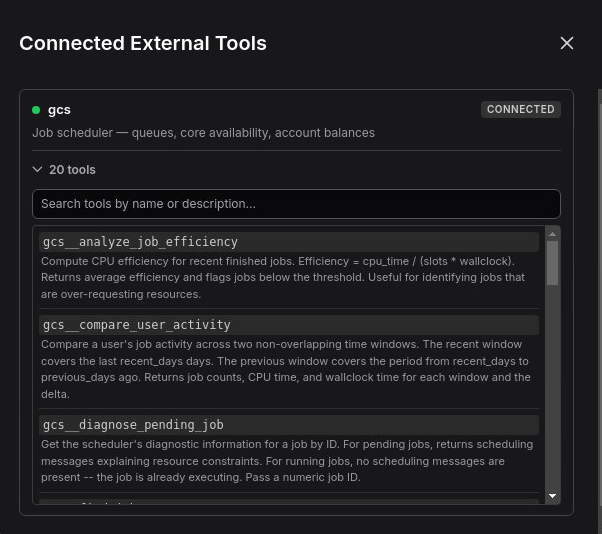
A warning indicator appears on the button if any server failed to connect.
Security Considerations
- External MCP server binaries run as child processes of the HPCBOX agent, which runs as the logged-in user. They inherit the user's filesystem permissions.
- Only administrator-configured servers are loaded. There is no user-level configuration.
- The
toolswhitelist limits the blast radius of a misconfigured or compromised server to the explicitly permitted tool names. - Tool name prefixing prevents an external server from shadowing built-in HPCBOX tools — for example, a server cannot expose a tool named
execute_workflowand intercept calls meant for the built-in tool. - Do not pass secrets in the
envfield — environment variables are visible in process listings. Use the server's own configuration file for credentials.